Samsung guide
Samsung Charging Port Problems Explained
Common causes of slow, loose or failed Samsung charging and the safe checks you can make.
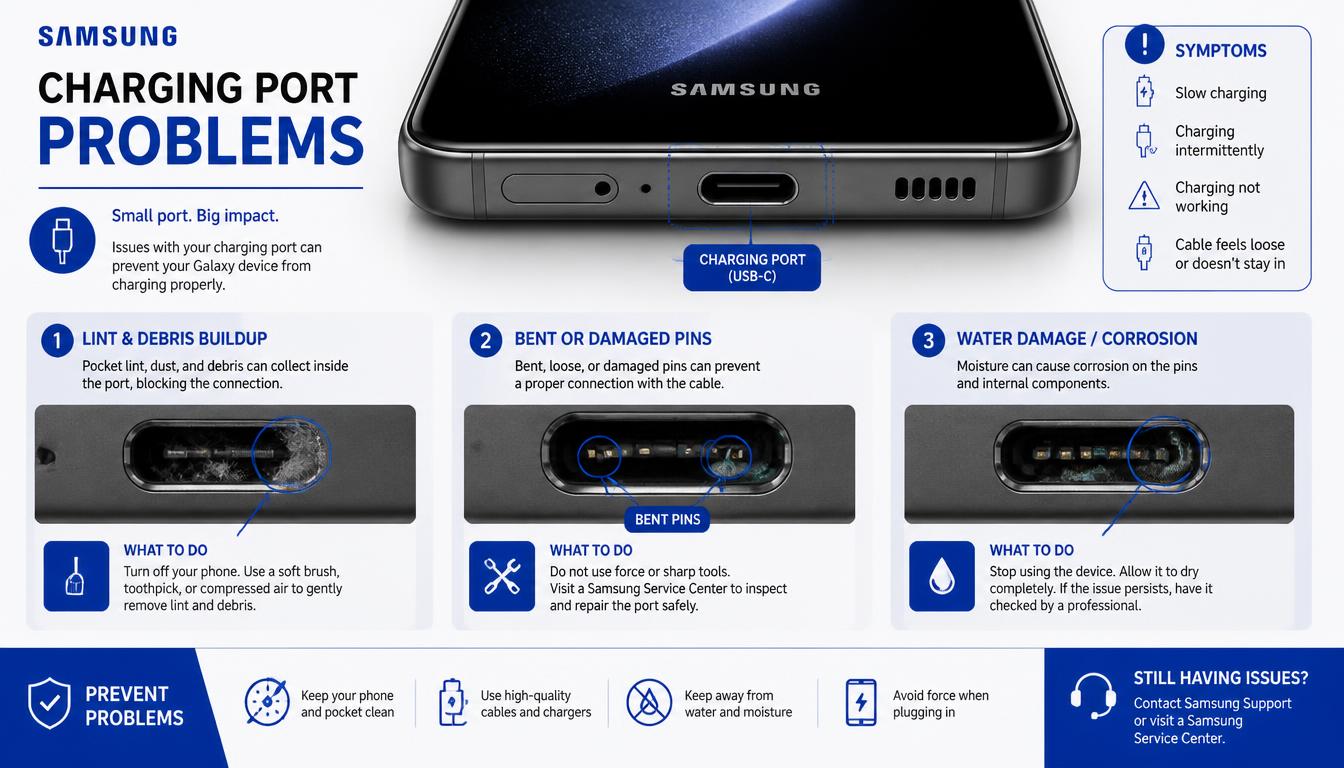
USB-C ports handle charging and data every day, so debris, moisture and connector wear can all affect performance.
What the symptoms can mean
A loose cable, charging that stops when moved, moisture alerts or failure with several chargers may indicate a port issue. Slow charging can also come from the adapter or battery.
What to do next
Test a compatible cable and power adapter, restart the phone and let any moisture warning clear naturally. Do not scrape the port with pins or other metal tools.
Cleaning versus replacing the port
Lint and debris compacted at the bottom of a USB-C port are responsible for a large share of charging complaints, and a careful professional clean restores normal charging in minutes. When the port itself is damaged — bent pins, a loose sub-board connector or corrosion after moisture — the port module is replaced instead. That repair involves opening the phone and should be done with the correct tools to keep the water seals intact.
When slow charging is not the port
Before blaming the port, check that the adapter actually delivers enough power for your model, that the cable is certified, and that no moisture warning is active. A battery nearing the end of its life can also charge slowly and drain quickly at the same time. Working through these possibilities in order saves an unnecessary repair.
When to arrange a diagnosis
If the problem continues after safe basic checks, a proper diagnosis is the best next step. It helps separate a replaceable part from a deeper board, power or software issue before any repair is approved.
Common questions
Can I clean my USB-C port myself?
A gentle pass with a dry wooden or plastic toothpick in good light is as far as you should go. Never use metal pins, needles or compressed liquid cleaners — they bend the pins that charging depends on.
Why is my Samsung charging slowly even overnight?
Slow overnight charging usually points to the cable or adapter rather than the phone. Test a certified charger of adequate wattage before booking a port repair.