iPhone guide
iPhone Not Charging? Safe Checks to Try First
Work through safe iPhone charging checks before arranging charging-port or battery repair.
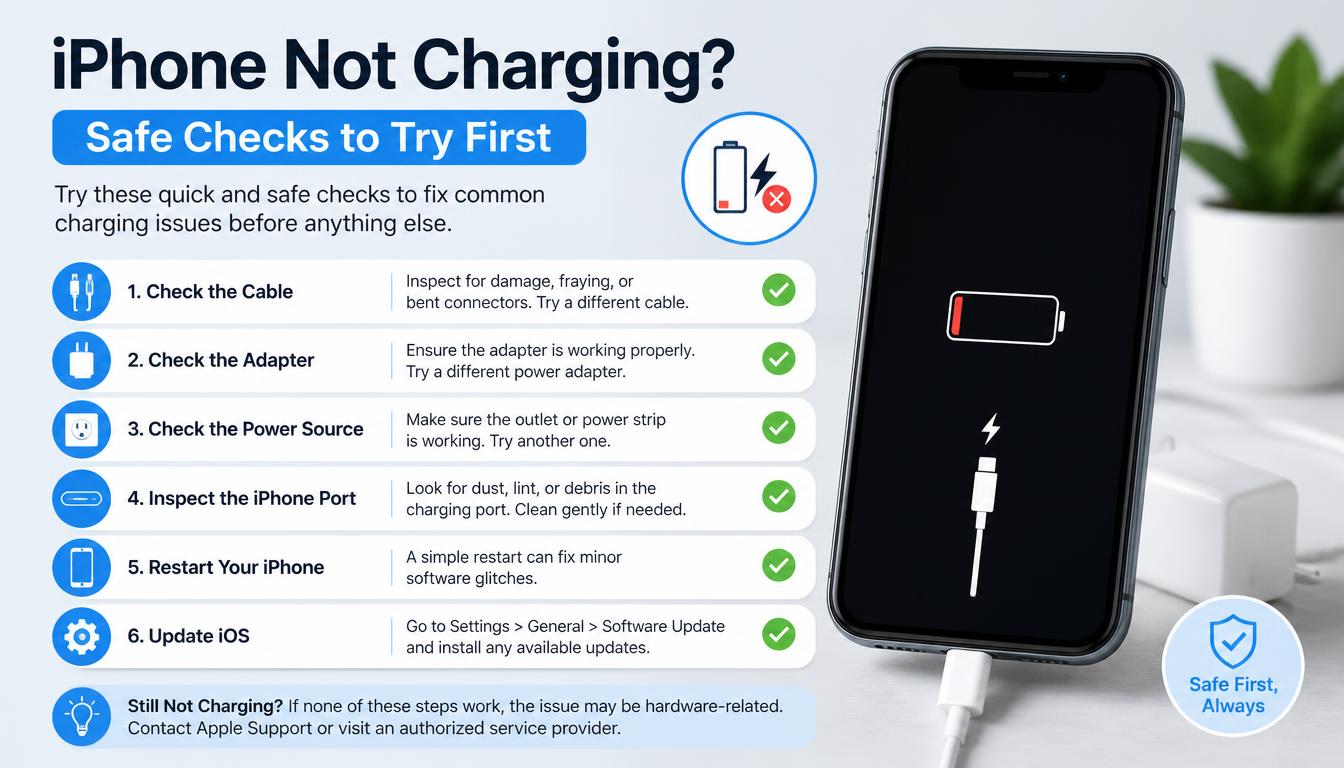
A phone that will not charge may have a cable, adapter, power source, software, battery or charging-port problem. Testing one variable at a time helps narrow it down.
What the symptoms can mean
Intermittent charging can come from debris or wear in the port. No response with several known-good chargers may point to the port, battery or power circuitry.
What to do next
Try another certified cable, adapter and wall socket. Restart the phone and inspect the port under good light, but never push metal objects inside. Persistent faults need diagnosis.
How technicians test a charging fault
A diagnosis starts with the accessories — the phone is tested with known-good cables and adapters to remove them from the equation. The port is then inspected under magnification for lint packed against the pins, bent contacts or corrosion, and the battery and charging circuitry are checked for correct voltage and current draw. This separates a quick port cleaning from a battery or board-level fault before any repair is quoted.
Port cleaning versus port replacement
Pocket lint is the most common cause of an iPhone that charges slowly or only at an angle, and it can usually be removed safely with the right tools and a bright light. If the pins inside are bent, worn or corroded, the port assembly itself needs replacement — a repair that involves opening the phone and should never be attempted with pins or needles at home.
When to arrange a diagnosis
If the problem continues after safe basic checks, a proper diagnosis is the best next step. It helps separate a replaceable part from a deeper board, power or software issue before any repair is approved.
Common questions
Why does my iPhone only charge at an angle?
That almost always points to debris compacted at the bottom of the port or worn connector pins. Gentle professional cleaning solves it in most cases; a loose or damaged port needs replacement.
Can a software update fix charging problems?
Sometimes. Charging behaviour is partly software-controlled, so installing the latest iOS is a worthwhile early step before assuming a hardware fault.